 Tutorial
Archived
Behavior Editing Tutorial
by Zooasaurus
In this tutorial, you will find out how to add and subtract behaviors from animals.
- Zoo Tycoon 2
- Animals
- Scripting
- Reading time
- 5 min
- Comments
- 0

Learn how to export animated and static models from Blender in NIF format.
by Hendrix
Load your BLEND-file with your finished model.
Click (in the top bar) File > Export > NetImmerse/Gamebyro (.nif & .kf & .emg).
Choose a location and a name for your exported NIF-file.
Make sure all buttons look like that if you want to export an actor (model with animations).
For static objects, activate Stripify Geometries.
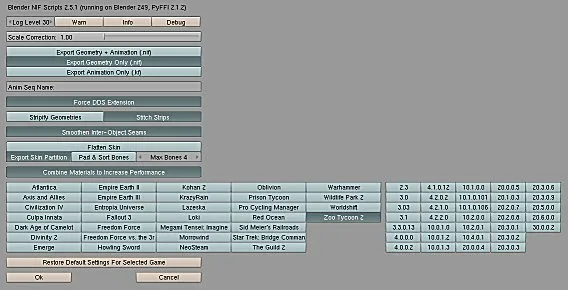
Click OK.
Tutorial
Archived
by Zooasaurus
In this tutorial, you will find out how to add and subtract behaviors from animals.
 Tutorial
Archived
by MarineManiac
This tutorial teaches how to use only cart based animals, but can be applied to shops.
 Tutorial
Archived
Comments 0
Log in to join the conversation.
No comments yet.