 Tutorial
Archived
Language Coding
Learn to translate Zoo Tycoon 2 animal names and Zoopedia entries using language XML files.
- Zoo Tycoon 2
- Scripting
- Reading time
- 8 min
- Comments
- 0

Learn to prepare exported NIF models for Zoo Tycoon 2 using Nifskope.
by Hendrix
Warning
Difficulty: Medium
Open the exported NIF, right-click the model and click Block > Copy Branch.
Open the base animal’s .nif file and find the NiBoneLODController by clicking the pluses. The NiBoneLODController is a child of the Bip01 node.
Right-click the NiBoneLODController and click Block > Remove.
Now remove all nodes that contain LOD and/or the animals in their name by right-clicking them and choosing Block > Remove Branch.
Optional: Remove all stuff that somehow remained, which is directly below the Scene Root and thus parent-less.
Select the Scene Root, right-click it and click Block > Paste Branch.
Make sure you can see both the Block List and Block Details.
In the Block List, find your NiTriShapeData.
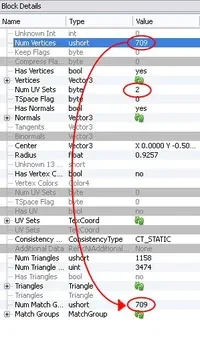
In the Block Details, edit the Value for Num UV Sets so it shows 2.
Note
This prevents the animal from blinking all over the body
Put the Value from Num Vertices into Num Match Groups, as shown in the image.
Note
This makes sure the animal is coloured on all game settings.
Click all of the green arrows or recycling buttons numerous times.
Save your NIF. It is now ready to be used in the game.
Tutorial
Archived
Learn to translate Zoo Tycoon 2 animal names and Zoopedia entries using language XML files.
 Tutorial
Archived
 Tutorial
Archived
by Ghost
Learn to disable animal cleaning and make animal waste invisible and odorless.
Comments 0
Log in to join the conversation.
No comments yet.